Sunday, June 30, 2013

"Bean There, Done That" Chicago Layout

The Trip
Last week, I was in Chicago for the first time and did a lot of the touristy things there, number one being taking pictures in front of the Cloud Gate sculpture in Millennium Park. 


The Layout
After returning from a trip, I like to immediately make one layout. That way, if I never get to making a mini-album or multiple layouts about the whole trip, I'd at least have a representative page for the year. Here is my layout about visiting "The Bean". 


The Details
I had this sheet of patterned paper, called "Let's Go" from Simple Stories that I wanted to use. I cut the arrows into strips and laid them out on my background paper, but found it to be too busy. I didn't want to give up on the idea, so I inked the edges in black and left a small space in between the strips, then it was not so overwhelming. 


I used sketch #114 from Sketches in Thyme for my layout. 


Here is my title using small Authentique alpha blocks. I also added a small silver bean I cut from a scrap of metallic paper. 


For my journaling, I wrote on a tag and added a piece of jute. Next to it I used a Maya Road wood veneer Polaroid frame on a leftover photo, which is actually our reflection off the Bean. 


I had purchased a "Summer Fun" kit from Scrapbook & Cards Today's blog. As I was packing for a crop, I just grabbed the kit as it had the colors I wanted for this layout and made this layout at the crop. 

I'm entering this in:
613 Avenue Create - #26 Anything Goes
Amusing Challenges - Anything Goes
Challenges $ Everybody - #23 Anything Goes
Simon Says Stamp! - Anything Goes
Sketches in Thyme - June Challenges

Thanks so much for stoppin' by,

Life.Paper.Scrapbook. Magazine

The Issue
Hello all! I've been following an Australian blog called Life.Paper.Scrapbook. that showcases crafters from around the world. They have really beautiful projects and fun challenges on their blog, plus they publish a free quarterly online magazine. As this is a relatively new site, their second issue just came out on Friday.

Life.Paper.Scrapbook. Issue 2 online magazine
I really admire the clean look of the featured projects so when I saw that they had a publication call for the second issue, I decided to submit a few of my own creations. I was quite surprised but delighted that they chose three of my submissions. To see the issue, just go here.

The Details
My layout, "Who Loves Their Auntie?" featuring Zemira as a little baby can be found on P. 56 of the Scrapbook Gallery. Here is a peek of the construction process. I'd just folded the squares to make my cathedral quilt and was lining up all the pieces.


My layout, "Welcome to L.A." about Lulu's arrival at LAX can be found on P. 78 of the Pet Gallery. Here is a peek of when I laying out the design of the page. 


This was the first time they had a Card Gallery, so I turned in this, "Somebunny Loves You" card which features a digi-stamp that I turned into a die cut on my Cameo. This is found on P. 98. 


Take a look at the magazine or the blog to see all the beautiful projects from designers around the world. You won't be disappointed. 

Thanks so much for stoppin' by,

Thursday, June 20, 2013

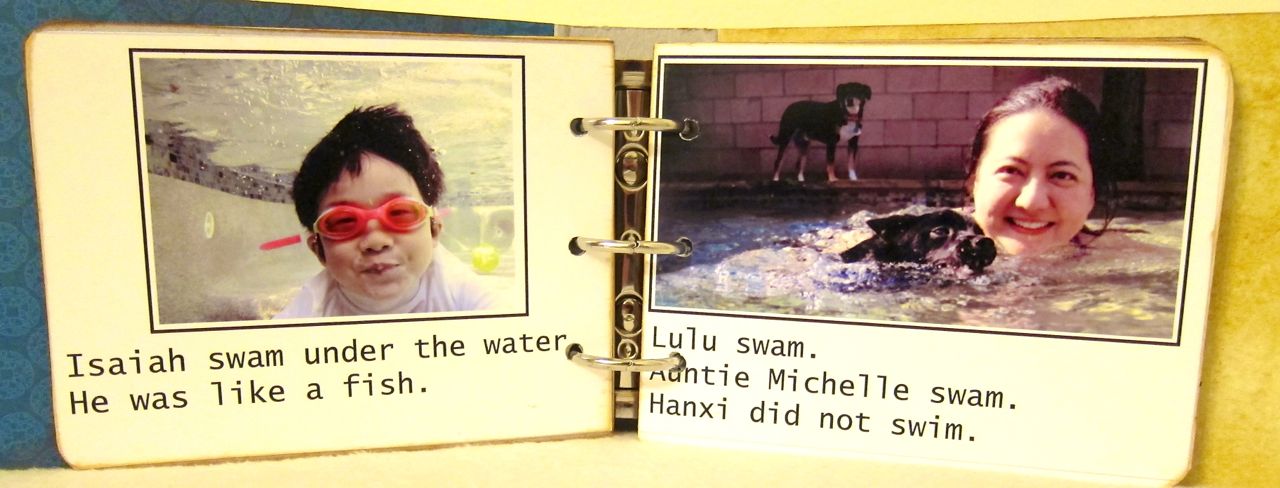
"Isaiah Goes Swimming" Mini Album Book

The Project
I made my nephew a mini-album/easy reader book. 


The Inspiration
When I was babysitting him, he had to practice his reading using a series of leveled reading books. These were "Hi-Lo" books, high interest-low readability, using a lot of site words and repeated patterns. But judging by the way he was squirming around and needing a lot of "redirection", I was thinking it was more like "Lo-Hi" books, low interest-high readability. 

I had just taken some photos of him using an underwater case on my camera and decided to make him a book in the same genre. 

The Details
I started by rummaging through my existing mini-albums and found this Maya Road 3 ring binder chipboard album. It was the perfect size at 4.5 x 7" and contained 6 sturdy pages inside. 

I used my desktop publishing program, QuarkXPress, and created a basic template for a page. It contained a photo box and text box which was the size of the chipboard page. Four pages fit on a sheet of 8.5 x 11" photo paper. In total, I created 12 pages using 3 sheets of photo paper. 


I cut out each page and adhered it to the chipboard pages. I decorated the cover using a minimum of 2-D elements for durability. It feels very sturdy, like the board books for babies. 

The Inside
Here is a look at the inside pages. 


Hope you enjoyed my scrapping meets education project.


Thanks for stoppin' by,

Monday, June 17, 2013
Love to Scrap! Easter in Bloom Layout

The Challenge
Welcome to the latest challenge for Love to Scrap! entitled "No Cards Allowed!" Any type of project can be entered, except for cards. I made a layout about going to Knott's Berry Farm with my nephew during Easter week. They had some special events during Knott's Berry Bloom.


The Sketch
I saw this Becky Fleck sketch on Pebbles Inc.'s blog last October and I stored it in the back of my mind, just waiting for the perfect opportunity to use it. It was a great fit with my photos and paper collection, so I was glad to finally be able to use such a cute sketch.


The Details
I chose American Crafts' Dear Lizzy's 5th & Frolic collection because of its beautiful spring colors. I cut out some Polaroid shapes from a piece of patterned paper in the collection and arranged those as the background grid to replicate the squares. The centers of the Polaroids were white so I filled some with different patterned papers or mini photos. I also left some as is. 


I mostly followed the sketch except I moved the main photos from the right to the left side of the page to better accommodate my journaling block. The little boy and girl graphics on my journaling block would have covered too much of the photo. 


Our sponsor for this challenge is Bugaboo Digi Stamps, who I just love. They gave all the DT members a different image to work with. I chose AKV sign it since it was so versatile and looked perfect for a journaling block. I actually imported the stamp into Silhouette Studio Designer and made a print and cut file. I printed it on my printer, then the Cameo cut it out for me so I wouldn't have to fussy cut around stick people with all those thin appendages. This technique is a great time saver, especially if you have to print and cut multiples of the same image. I then colored the image with Copics. 


Lastly I used some American Crafts foam alphabet stickers for my title. The foam alpha are pliable and much easier to maneuver than chipboard alphas. Also the adhesive is better so they don't fall off like the chipboard letters. I was at a crop and my friend Becky donated these letters to me since I only had black alphas with me. 


The challenge runs until June 23 and the winner will receive 7 digital stamps from Bugaboo Digi Stamps. Please join us and link up your creation or just drop by Love to Scrap! to see all the other projects from the design team.

I'm entering this in:
The Crafty Bloggers Network - Challenge #12: Bright and Breezy
Make it Monday - #145 Anything Goes
Eureka Stamps - #44 Anything Goes
Mema's Crafts - June Anything Goes


Thanks so much for flutterin' by,